Seiko 7A38 - by the numbers
Subtitle
Forums
| Forum Home > General Discussion > Sticky: How to upload a photo to this forum .... | ||
|---|---|---|
 Member Posts: 24 |
Ok Paul, will do. At least i can fix it now if it happens again! Thanks! | |
| ||
 Member Posts: 1 |
Some forums also allows to use the "[img][/img]" codes and automatically fetch photo from its source. | |
|
-- web design gold coast services
| ||
 Site Owner Posts: 14428 |
Yes, Mike - I'm aware of that. But this forum uses a Webs software template which requires a slightly different methodology. | |
| ||
 Site Owner Posts: 14428 |
It's nearly a year since PhotoBucket changed its 'look and feel' - mostly to suit the mobile device (greasy finger screen wiper) users. Although I railed against it at the time, I must admit I've got used to using the 'new' version and it's just as simple and straight-forward. So as something of a belated update, here's a brief 'how to' lesson for embedding an image (or multiple images) in a post using PB. First you find the image in your library (or recent uploads). My library is quite large / complex, but I'll use the same example as before.
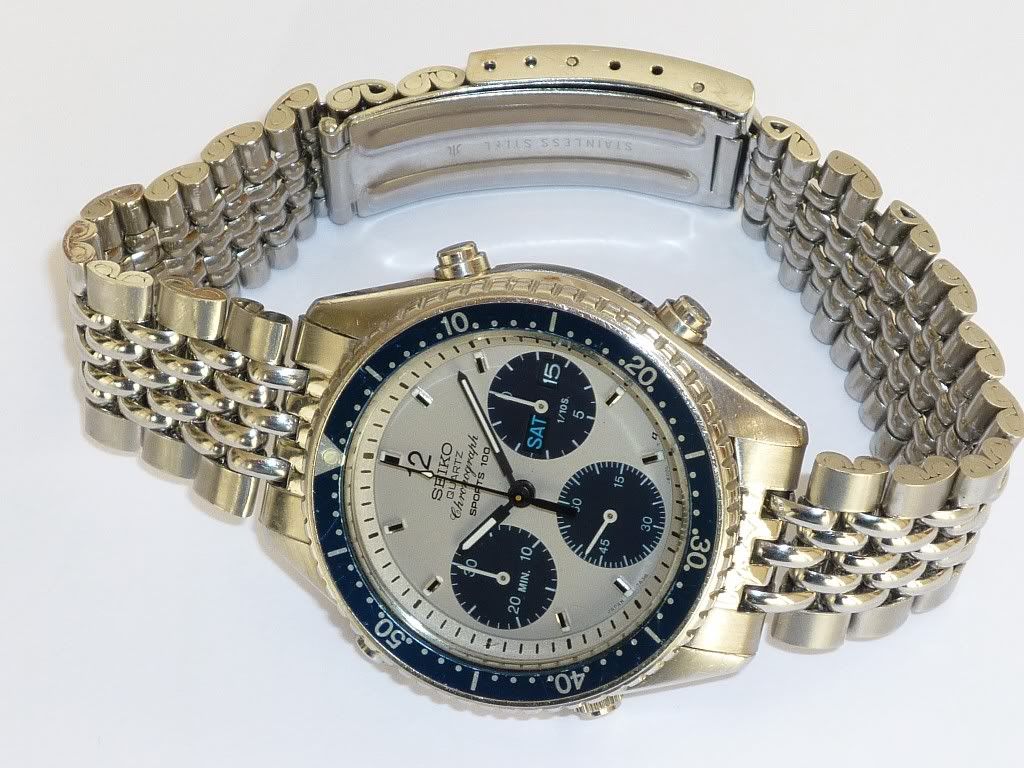
There it is (ringed in red) - the same overlit photo of my 7A38-6000 'Dinky Diver' on its vintage Seiko 'Beads of Rice' bracelet. The filename is the same as before: P1030867-Resized.jpg and it lives in the same Photobucket sub-folder: /Seiko7A38/7A38-60x0/.
Hover over the photo and first a 'gear wheel' will appear in the top RH corner. Move down slightly and a pop-up box appears. The part you want is 'Get Links'. Click on that link and another larger pop-up box appears (and the screen behind greys out).
As I've stressed before in the earlier instruction, what you need for this forum's software is the DIRECT link (NOT the IMG image code).
Click on that (you may sometimes need to do it more than once) and the box goes yellow - and it says 'Copied'. Once you've done that, tab / toggle back to your forum post and click on the 'Insert Image' icon. A pop-up box will appear. Paste the code that you've copied from PhotoBucket in there:
Hit the 'Submit' button and if you've done it correctly, your post should look like my 'Test Post' below. It really is THAT easy. | |
| ||
 Site Owner Posts: 14428 |
Test Post
| |
| ||
 Site Owner Posts: 14428 |
There is also another slightly different way of doing it. If instead of hovering over the thumbnail of your chosen image, you click on it, you'll see a screen something like this:
Again it is the DIRECT link (NOT the IMG image code) you want - and otherwise the process for embedding the photo is just the same. | |
| ||
 Site Owner Posts: 14428 |
Apart from the functional changes to Photobucket, the other main reason I thought it worth updating this thread was because besides Chris 'Prospex44' having the same problem (see his posts at the bottom of the previous page), three relatively new forum members: Carlo ('Ketap') Kent ('Atmosfarsvetare') and Dave have also had a problem with slightly distorted photos caused by image re-sizing. See page 5 of the 'Intro' thread. Here's a partial copy and paste of my post from a few weeks ago:
There was (or still is) a slight problem with your photos. I've seen this happen with a few other posters (including Carlo previously). Somehow the images appear to be stretched top to bottom (in fact they're actually compressed sideways to fit the page width). It's to do with the Photobucket image coding. You don't need the part 'Height=768 Width=1024'. The forum software will resize for you.
I've fixed the first four images, by editing your post (in HTML). Let me know when you've read this and I'll adjust the others for you. I'm still none the wiser where you guys have been picking up the (incorrect) coding that includes the Photobucket image re-sizing, but if you follow my updated instructions above, to the letter, then you shouldn't encounter any such problems. Famous last words ! | |
| ||
 Site Owner Posts: 14428 |
Whereas the 'newest' version of Phototobucket seems to have eventually stabilized, Flickr's new format is still evolving. I recently tried to help new member, Uwe 'Alobar' embed 3 photos hosted in his Flickr account in his intro' post (using his links).
I hadn't used either of my Flickr accounts in ages. When I tried to log into this one: http://www.flickr.com/photos/seiko_7a38/ it gave me the option to sign in via Gmail or Facebook (which I don't use) but then expected me to have an associated Yahoo email account. Needless to say, I gave up at that point. Seems from this recent thread on RLT that I'm not the only one who's frustrated with Flickr. http://www.thewatchforum.co.uk/index.php?showtopic=89763 Flickr Wtf ?!? Warning Rant Quotes include: Flickr is driving me crackers at the moment and Who the hell has a Yahoo sign on these days? Uwe and I succeeded at the third attempt. The working links that he supplied me with (which I used in his re-edited intro' post) began: https://farm8.staticflickr.com/.... a similar format to that which I had detailed on the first page, when using Flickr as the image host. Presumably the link you need for this forum's software is still lurking somewhere under the HTML icon. Though how you get to it if you can't sign in anymore (like myself) is anybody's guess. | |
| ||
 Member Posts: 9 | Well now - I'm one of those greasy fingered smartphone users. And I'm blowed if I can see how to insert an avatar image in my profile. It also looks like the only way to drop an image into a post is to do it via Flickr, as I get none of the option icons along the top edge of my draft post, making Photobucket no use. It also means I can't muck about with enhanced text (not a problem). But I also don't seem to be able to insert paragraphs - no matter how many times I swipe the return key! Ah well. Must keep trying... | |
| ||
 Site Owner Posts: 14428 |
Although I'm personally still currently using PhotoBucket (as a paid subscriber) to remotely host images on this forum .... Sadly I can no longer recommend it to any prospective users. Its days as a business are probably numbered. See recent updates to this thread: Problems with uploading images to PhotoBucket Alternative free photo hosting sires being suggested on other forums include: imgBB.com, imgur.com and postimage.io As long as Photobucket don't block my 19,000+ images (theoretically and legally they shouldn't, because they've just taken a $29.99 / year annual renewal payment, only a week ago for their Plus20 service), I shall continue to use their service. If PhotoBucket folds, as many are predicting, I will probably revert to using Flickr - if I can figure out how to log back into it (without using a Yahoo eMail logon). My Seiko_7A38 Flickr account, although unused for 5 years plus, still exists. | |
| ||




You must login to post.